Half-Trend Indicator is one of the most wanted indicator. It provides a clear trend projection with the entry signal and the SL trailing. Trader could use it alone or combining with other indicators to confirm the entry. However, the Half Trend Indicator does repaint its entry signal on the current running bar. You should take into account for your entry when the bar closed with the signal. It’s easy to code and Expert Advisor for this as well.
How To Setup Half Trend Indicator
Firstly, On your Terminal go to File –> Open Data Folders –> MQL4 –> Indicators. Secondly, paste the ex4 file you downloaded into Indicators folder. Next you need to refresh your terminal by close and open it again or by Right Click on Navigator windows and click Refresh. To include the indicator your charge, simply double click on the Half-Trend Indicator on your Navigator windows or Drag it and drop on your chart –> make change on setting and click OK.

- Amplitude: This number of frequency used by the indicator to filter the trend. The larger the number is, the fewer signal would be.
- ShowBars: Set this input to true if you want the indicator to show the shadow below/above the trendline. It’s usually for the SL trailing.
- ShowArrows: Set this input to true if you want the indicator to show the Arrow that indicator the entry signal.
- alertOn: If you set this to false, there will be no alert notification provided. It cancel all setup below it.
- alertOnCurrent: Recommended to keep it as false since it’s better to receive the alert notification only after the bar closed no on the current running bar. This way you can avoid the repaint signal.
- alertsMessage: If this input set to be true like the alertOn, everytime the entry signal signal shown on the chart you will receive a popup message on your terminal screen and your mobile terminal.
- alertsSound: If you set this to true then the indicator will play the sound will for each alert notification.
- alertsEmail: set this to tree if you want to received.
How It Works
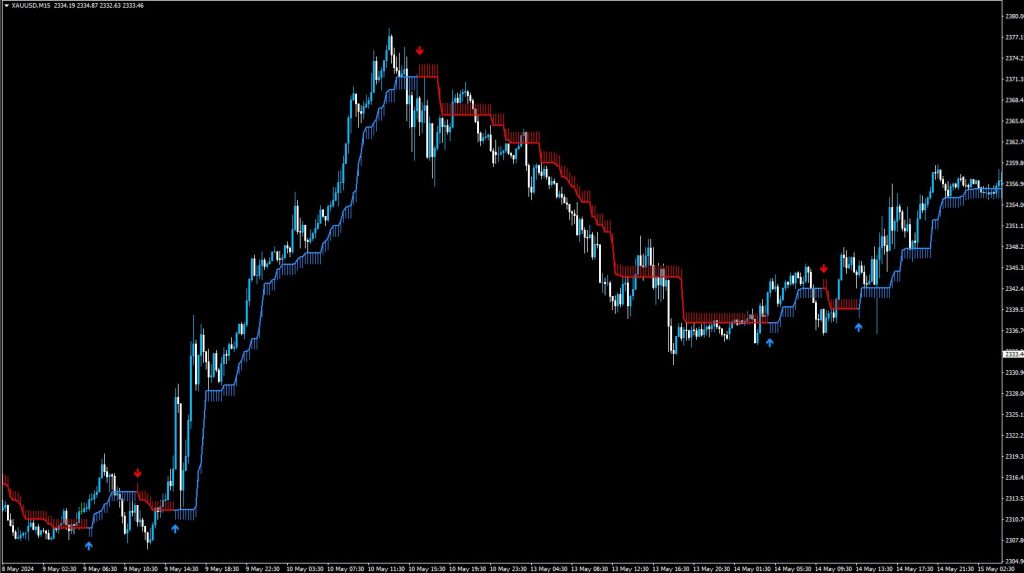
It is straight forward. You can just simply place your entry with its signal alone or filter with other indicator such as Trends or Oscillators. In the picture, the thick trendline in Red and Lime color is the Half-Trend Line, the red line indicates the bearish momentum and the lime one indicator the bullish momentum. The shadows above/below the half-trend line is the additional distance you can use as the SL trailing.
- SELL Entry: When the Half-Trend Indicator shows the Down Arrow in Red is the SELL signal, you can place SELL trade and put SL right above the arrow for the safer side and TP at 2 times of SL.
- BUY Entry: When the Half-Trend Indicator shows the Up Arrow in lime is the BUY signal, you can place BUY trade put SL right below the arrow for the safer side an TP at 2 times of SL.
Check out the SSL MTF and Trend Power Indicator as well!
Want an Expert Advisor for Half Trend Indicator? Join Our Telegram
Need a VPS to run Expert Advisor? Click Here To Register!

Download Below: