QQE Indicator is very popular among traders in Metatrader and Tradingview. Its feature serves both scalping and swing strategy. Because it is Oscillator indicator, most trader prefer to use it with other trend indicators such as Moving Average or Golden Band.
How To Setup QQE Indicator
Firstly, on your Terminal go to File –> Open Data Folders –> MQL4 –> Indicators. Secondly, paste the ex4 file. Next you need to refresh your terminal by close and open it again or by Right Click on Navigator windows and click Refresh. To include the indicator your chart, simply double click on the QQE Indicator on your Navigator windows or Drag it and drop on your chart –> make change on setting and click OK.
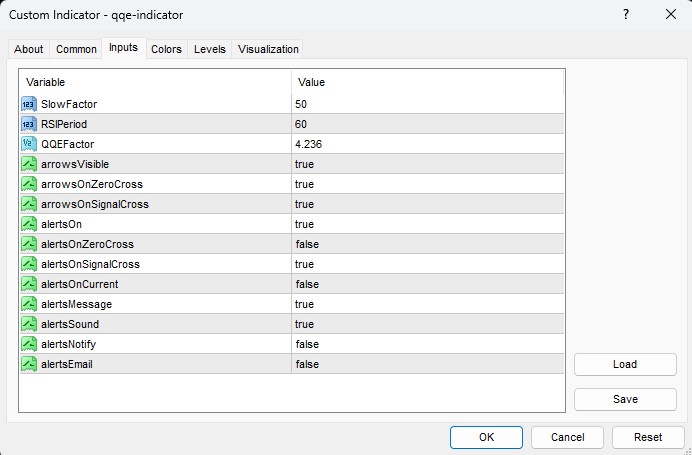
- SlowFactor: Here you enter the factor to calculate the QQE singal.
- RSIPeriod: Enter the period of Related Strength Index (RSI) for filtering signal.
- QQEFactor: This factor is for calculation the QQE trend.
- arrowsVisible: If true, the indicator will show the signal arrows on your chart.
- arrowsOnZeroCross: if true, the indicator will show the signal arrow after the QQE line crosses the zero line.
- arrowsOnSignalCross: if true, the indicator will show the signal arrow after the QQE line crosses the Signal line.
- alertsOn: set to true for turning on the alert feature.
- alertsOnZeroCross: if true, the indicator will start the alert when the QQE line crosses the zero line.
- alertsOnSignalCross: if true, the indicator will start the alert when the QQE line crosses the Signal line.
- AlertsOnCurrent: if true, the indicator will show alert on the current bar. You should set it to false, so you won’t have the repaint signal.
- alertsMessage: if true, the indicator will alert in the form of the popup message on your chart screen.
- alertsSound: if true, during the alert you will hear the sound.
- alertsNotify: set it to true if you want to receive a notification on your mobile MT4 terminal
- alertsEmail: if true, the indicator will email to your mail box.
How QQE Indicator Works
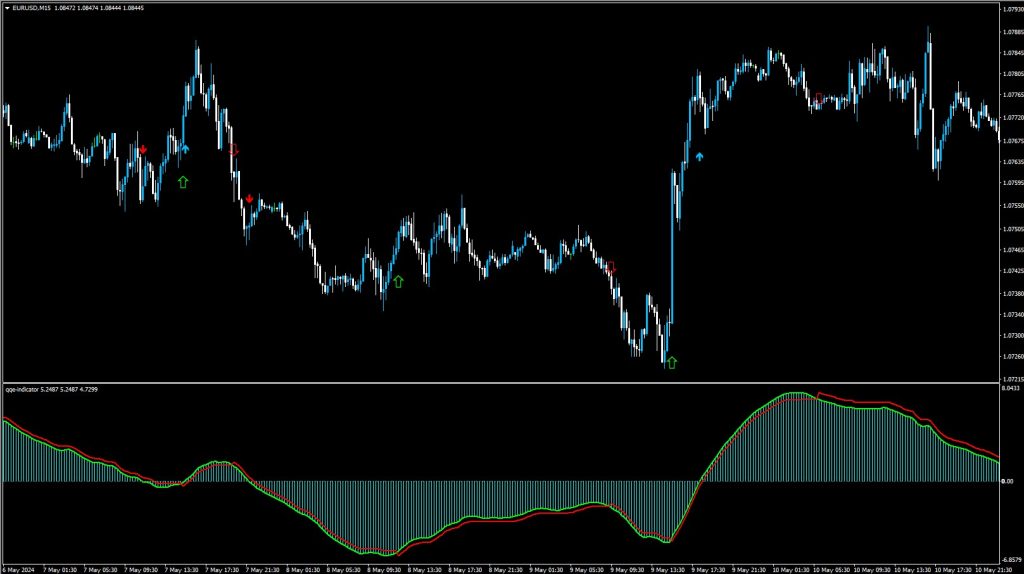
There is a sub-windows on your chart where you can see the Signal Line in red and the QQE Line in lime.
- SELL Entry: When QQE Line crosses below the Zero or Signal Line, you place SELL order on the open of next bar.
- BUY Entry: When QQE Line crosses above the Zero or Signal Line, you place BUY order on the open of next bar.
Want an Expert Advisor for QQE Indicator? Join Our Telegram
Need a VPS to run Expert Advisor? Click Here to Register

Download Below: