This is simple trend indicator you are looking for. Golden Band Indicator can detect the market trend up to 80% of accuracy. The trader uses it as trend confirmation not as a signal. We can some signal indicators such as QQE Indicator and Half-Trend Indicator to trade with it.
How To Setup Golden Band Indicator
Firstly, On your Terminal go to File –> Open Data Folders –> MQL4 –> Indicators. Secondly, paste the ex4 file you downloaded into Indicators folder. Next you need to refresh your terminal by close and open it again or by Right Click on Navigator windows and click Refresh. To include the indicator your charge, simply double click on the Golden Band Indicator on your Navigator windows or Drag it and drop on your chart –> make change on setting and click OK.
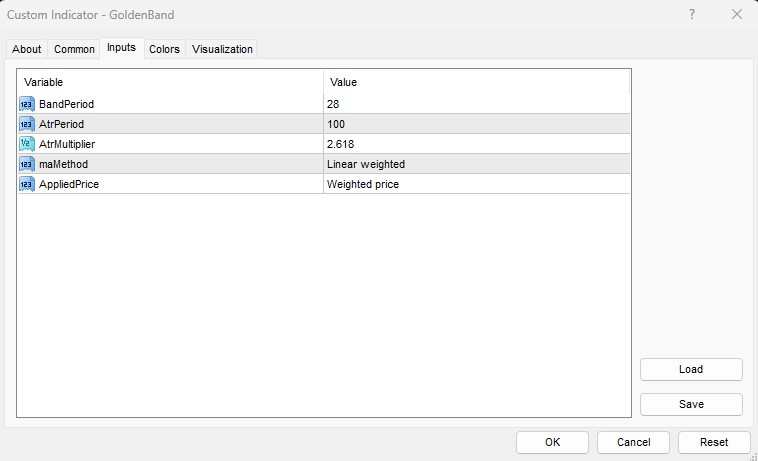
- BandPeriod: the number of period the indicator use in calculating the band.
- AtrPeriod: the number of period of the Average True Trange (ATR)
- AtrMultiplier: the multiplier for ATR
- maMethod: the Method of Moving Average for calculation the cloud
- AppliedPrice: the Price option for Moving Average calculation
How Golden Band Indicator Works
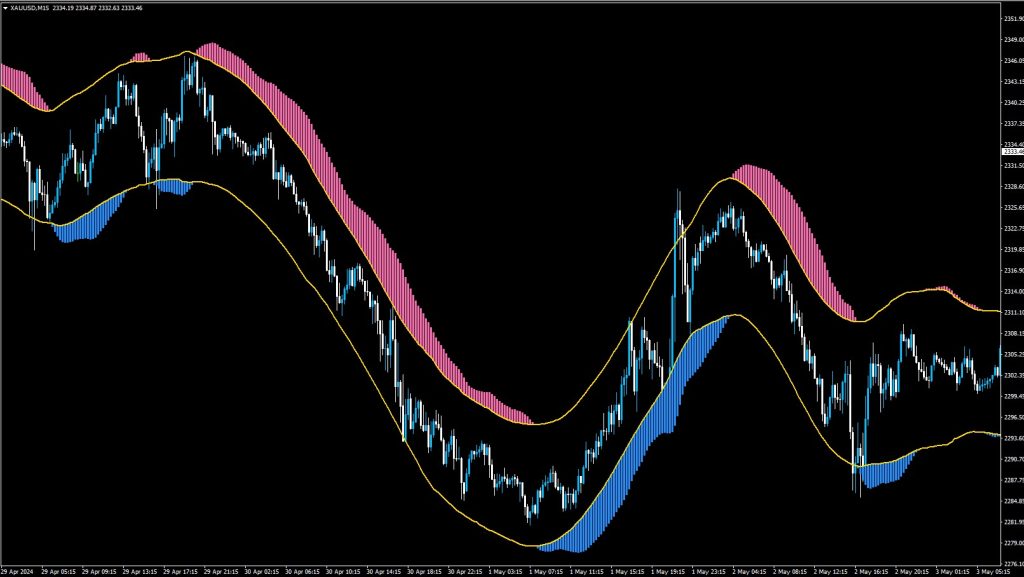
Just like the name suggest, it is the trend indicator using band as the boundary. Upon the installation on your chart, you will see 4 elements. First, the lower smooth line is the Lower Band as the lower boundary. Second, the upper smooth line is the Upper Band as the upper boundary. Third, the cloud right below the Lower Band is the Bullish Cloud. Last but not least, the cloud right above the Upper Band is the Bearish Cloud. The Bullish Cloud shows the up trend momentum and you look for BUY opportunity only. The Bearish Cloud shows the down trend momentum and you look for SELL opportunity only.
Want an Expert Advisor for Golden Band Indicator? Join Our Telegram
Need a VPS to Run Expert Advisor? Click Here to Register

Download Below: